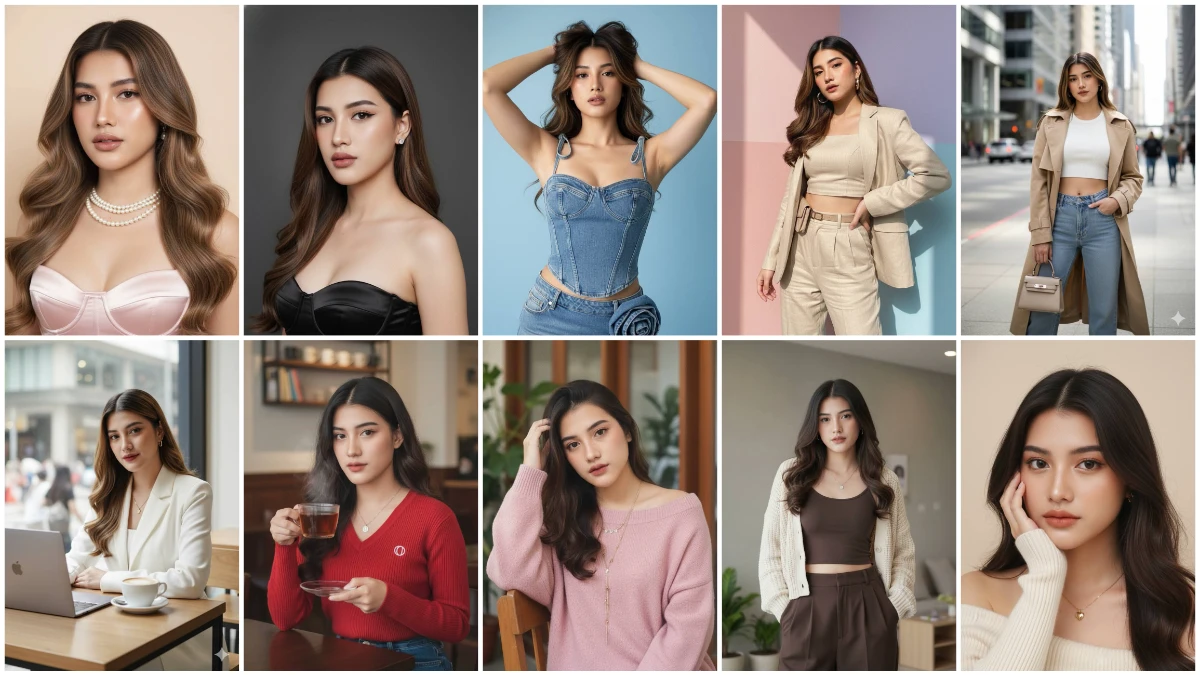
The world of AI image generation has revolutionized digital creativity, and Google Gemini’s Nano Banana technology stands at the forefront of this transformation. Whether you’re a content creator, digital artist, or social media enthusiast, learning to create stunning AI images with Google Gemini opens up limitless creative possibilities. This comprehensive guide will walk you through everything you need to know about generating breathtaking images using this powerful AI technology.
Understanding Google Gemini Nano Banana
Google Gemini represents Google’s most advanced AI model family, designed to understand and generate content across multiple formats. Gemini Nano is the lightweight, efficient version optimized for on-device processing, while “Banana” refers to the specific implementation that enables fast, high-quality image generation.
Unlike traditional image creation that requires expensive software, photography equipment, or advanced artistic skills, Gemini Nano Banana democratizes image creation. You simply describe what you want in natural language, and the AI generates photorealistic images within seconds.
The technology leverages Google’s Imagen 3 model, which has been trained on billions of images to understand visual concepts, artistic styles, lighting techniques, composition principles, and object relationships. This training enables Gemini to create images that rival professional photography and digital art.
Getting Started with Google Gemini Image Generation
Accessing the Platform
You can access Google Gemini’s image generation capabilities through multiple channels. Visit gemini.google.com and sign in with your Google account for the main conversational interface. Alternatively, use labs.google/imagefx for dedicated image generation with enhanced exploration tools, or download the Gemini mobile app available on Android and iOS devices.
Each platform offers the same underlying technology but with different interfaces. The main Gemini site integrates image generation into conversations, ImageFX provides focused image creation tools, and the mobile app enables on-the-go generation.
Creating Your First AI Image
Start by clearly visualizing what you want to create. Think about the subject, setting, lighting, mood, style, and specific details that make your image unique. Then, describe your vision in conversational language.
For example, instead of typing technical commands, simply write: “Create a serene mountain landscape at sunset with pink and orange clouds, a crystal-clear lake reflecting the sky, pine trees in the foreground, photorealistic style.”
Gemini processes your description and generates the image within 10-30 seconds. The AI interprets your natural language, understanding context, artistic preferences, and technical requirements automatically.
Step 1: Mastering Prompt Creation
The quality of your AI-generated images depends heavily on how you describe them. Effective prompts follow a clear structure while remaining conversational.
Essential Prompt Components
Subject description – Clearly state what the main focus is. Be specific about objects, people, animals, or concepts. Instead of “a dog,” specify “a golden retriever puppy with blue eyes.”
Setting and environment – Describe where the subject exists. Include location details like “in a modern kitchen,” “on a tropical beach,” or “floating in space.”
Lighting conditions – Specify illumination such as “golden hour sunset lighting,” “dramatic studio spotlights,” or “soft diffused natural light through windows.”
Mood and atmosphere – Convey the emotional tone: “peaceful and serene,” “energetic and vibrant,” or “mysterious and moody.”
Art style – Define the visual aesthetic: “photorealistic,” “oil painting,” “watercolor,” “digital art,” “3D render,” or “vintage film photography.”
Technical details – Add specifics like “shallow depth of field,” “wide-angle perspective,” “macro close-up,” or “aerial view.”
Example Prompts That Work
For portraits: “Photorealistic portrait of a woman with curly red hair, wearing a vintage floral dress, standing in a sunflower field, golden hour lighting, warm tones, professional photography style, shallow depth of field.”
For landscapes: “Majestic snow-capped mountain range during sunrise, vibrant purple and pink sky, misty valleys below, evergreen forest in foreground, HDR photography, epic cinematic composition, 8K quality.”
For creative concepts: “Surreal digital art of a floating island with waterfalls cascading into clouds, bioluminescent plants, ancient ruins, glowing crystals, magical atmosphere, fantasy illustration style, highly detailed.”
For product imagery: “Minimalist product photography of a sleek smartphone on white marble surface, dramatic side lighting creating shadows, reflections visible, professional studio setup, commercial advertising quality.”
Step 2: Enhancing Your AI-Generated Images
Once Gemini creates your base image, professional enhancement tools can elevate it to extraordinary quality.
Topaz Photo AI for Quality Enhancement
Topaz Photo AI uses advanced neural networks to improve image quality dramatically. Upload your Gemini-generated image and apply automatic enhancements that sharpen details without creating artifacts, reduce any generation noise or imperfections, enhance colors and contrast naturally, and upscale resolution 2x to 4x while maintaining quality.
For AI-generated images, Topaz particularly excels at refining textures, improving facial details in portraits, and enhancing landscape elements like foliage and water.
Magnific AI for Intelligent Upscaling
Magnific AI doesn’t just enlarge images—it intelligently adds realistic details during upscaling. Transform your 1024×1024 Gemini image into stunning 4K or 8K resolution. The AI adds fine texture to surfaces, enhances intricate patterns and details, improves sharpness across the entire image, and maintains natural appearance without over-processing.
Adjust the “Creativity” slider to control detail addition. Lower settings (0.1-0.3) maintain fidelity to the original, while higher settings (0.4-0.6) add more interpretative detail.
Adobe Lightroom for Color Grading
Import your enhanced image into Adobe Lightroom for professional color grading. Adjust exposure and contrast for perfect balance, fine-tune individual color channels, apply cinematic color grades, add subtle vignetting for focus, and create presets for consistent style across multiple images.
Lightroom’s AI-powered tools like Auto Enhance provide excellent starting points, which you can then refine manually for your specific aesthetic vision.
Step 3: Creating Variations and Iterations
Rarely is the first generation perfect. Gemini excels at iterative refinement, allowing you to explore variations and improvements.
Refining Details
If an element isn’t quite right, modify your prompt to address it specifically. Add more descriptive adjectives, specify exact colors or materials, adjust lighting descriptions, or change the perspective or angle.
For example, if a portrait’s lighting is too harsh, regenerate with “soft diffused lighting” or “gentle window light” instead of generic “good lighting.”
Exploring Different Styles
Generate the same subject in multiple artistic styles to discover which works best. Try your subject as a photorealistic image, oil painting, watercolor illustration, digital art, pencil sketch, or 3D render.
This exploration helps you understand how style dramatically affects mood and impact, teaching you which aesthetics suit different subjects.
Creating Series and Collections
Build cohesive image collections by maintaining consistent elements while varying others. Keep the same color palette, maintain similar lighting style, use consistent composition approach, but vary subjects or scenes.
This technique works excellently for social media content, where visual consistency strengthens brand identity.
Step 4: Transforming Images into Video Content
Static images are impressive, but AI video generation takes creativity further by adding motion and life to your creations.
Runway ML for Image Animation
Runway ML’s Gen-2 technology animates static images into short video clips. Upload your enhanced Gemini image and describe desired motion: “camera slowly panning right,” “gentle zoom in on subject,” “subject turning head slightly,” or “ambient movement like swaying trees and flowing water.”
Runway generates 4-5 second clips with realistic motion that breathes life into static imagery, perfect for social media content, website headers, or presentation materials.
Pika Labs for Creative Video Effects
Pika Labs offers more stylistic and creative video generation. Upload your image and request effects like “floating particles around subject,” “dramatic lighting changes,” “environment transforming from day to night,” or “magical energy emanating from objects.”
These effects work exceptionally well for fantasy imagery, creative concepts, and eye-catching social media content that stands out in crowded feeds.
Advanced Techniques for Professional Results
Combining Multiple AI Tools
Professional creators often use multiple AI tools in sequence for optimal results. Generate base image in Gemini, upscale with Magnific AI, enhance details with Topaz Photo AI, color grade in Lightroom, and animate with Runway ML.
This workflow combines each tool’s strengths, resulting in professional-quality outputs that exceed what any single tool produces alone.
Using Reference Images
While Gemini generates from text descriptions, you can describe existing images or styles to guide generation. Reference famous photographs, mention specific artists or photographers, describe films or artwork that inspire your vision, or reference cultural or historical aesthetics.
For example: “Create an image in the style of National Geographic wildlife photography” or “Generate a portrait with Rembrandt lighting technique.”
Batch Generation for Efficiency
When creating multiple related images, generate several variations in one session. This approach saves time, maintains creative momentum, allows comparison of different approaches, and helps identify the strongest concepts.
Generate 4-6 variations of your prompt with slight modifications, then select the best for enhancement and further refinement.
Best Practices for Stunning AI Images
Be specific and descriptive – Detailed prompts yield better results. Instead of “beautiful landscape,” try “majestic mountain landscape with alpine meadow flowers, dramatic storm clouds, ray of sunlight breaking through.”
Understand AI strengths – Gemini excels at realistic imagery, natural scenes, portraits with clear descriptions, and imaginative concepts. It handles these better than extremely abstract or highly technical subjects.
Iterate thoughtfully – Don’t change everything at once. Adjust one aspect per iteration to understand what improvements work.
Study successful examples – Explore ImageFX’s featured examples or community galleries to see effective prompts and techniques.
Maintain ethical standards – Don’t create misleading deepfakes, respect copyright and intellectual property, avoid generating harmful content, and disclose AI generation when appropriate.
Experiment freely – AI image generation allows risk-free experimentation. Try unusual combinations, explore different styles, and push creative boundaries without cost or consequence.
Common Challenges and Solutions
Challenge: Generated image doesn’t match vision Solution: Break your concept into clearer components and describe each specifically. Sometimes complex ideas need simpler, more explicit descriptions.
Challenge: Inconsistent quality across generations Solution: Save prompts that produce good results. Build a library of effective descriptions you can modify for new projects.
Challenge: Difficulty creating specific subjects Solution: Provide more context and detail. Instead of “a chair,” try “a modern ergonomic office chair with mesh back and chrome base.”
Challenge: Images lack professional polish Solution: Always enhance generated images using tools like Topaz or Magnific. Raw AI generations often need refinement for professional use.
Prompt List

Create a portrait of a beautiful woman with long wavy hair wearing a pastel pink corset and pearl jewelry, standing against a light peach or cream background, soft daylight with gentle shadows, glossy soft lips, natural glam makeup, elegant expression, shallow depth of field, professional studio composition, 8K high-quality realistic photography, feminine and classy mood. Use my uploaded photo as reference. Copy my face 100%.

Realistic studio portrait of a beautiful woman with long silky brown hair, wearing a fitted black satin corset top and diamond earrings, posing under soft spotlight against a matte charcoal gray background, wearing smooth but glamorous makeup with sharp eyeliners and soft lips, elegant posture, cinematic lighting with gentle shadows, DSLR photo, ultra-detailed skin texture, professional editorial style, modern luxury vibe. Use my uploaded photo as reference. Copy my face 100%.

Realistic portrait of a beautiful woman with long brown hair styled in soft waves, wearing a denim corset top with tie straps and a matching denim mini skirt featuring a large fabric rose detail, posing confidently with both hands raised near her head, solid light blue background, flawless natural makeup with soft lipstick and defined eyeliner, smooth skin tone, elegant expression, soft studio lighting, DSLR 85mm lens, high-fashion editorial photography, ultra-detailed texture, 8K resolution, clean minimalist composition, confident and feminine mood. Use my uploaded photo as reference. Copy my face 100%.

A beautiful woman wearing a beige outfit, standing against a minimalist pastel wall. Her expression is confident and radiant, showing empowerment and grace. Natural sunlight hits her side, casting soft shadows. The tone is modern, colorful, and fresh — perfect for fashion or lifestyle photography. Use my uploaded photo as reference. Copy my face 100%.
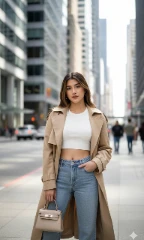
A fashionable woman standing on a city sidewalk, wearing a beige trench coat over a white crop top and high-waisted jeans. She’s holding a mini handbag, with sunlight reflecting off nearby glass buildings. She’s looking at the camera. The photo has a modern, lifestyle vibe — clean tones, crisp shadows, and soft focus on her outfit. Use my photo as reference. Copy my face 100%.

A modern woman sitting at a café table, laptop open beside her coffee cup. She wears a white blazer and minimal jewelry, exuding a boss-lady aura. Lighting is clean and bright, urban background slightly blurred. The vibe is confident, stylish, and empowered. Use my uploaded photo as reference. Copy my face 100%.

Create a young woman with long, wavy dark brown hair is seated at a wooden table in a cafe, holding a clear teacup with hot tea in her right hand and a small saucer in her left. She is wearing a ribbed red knit sweater with a small white emblem on the chest and dark blue jeans. She has a delicate silver necklace with a small pendant. The background shows blurred cafe shelving and seating. Use the uploaded photo as reference. Copy my face 100%.

Create a young woman with long, dark wavy hair is seated on a wooden chair, with her right hand gently touching her hair. She is wearing a soft, oversized light pink knitted sweater with a wide neckline, and a long gold layered necklace. Her makeup features a subtle pink lip and natural eye makeup. The background shows a warm, softly lit interior with blurred greenery and wooden window frames. Use the uploaded photo as reference. Copy my face 100%.

Create a full-body indoor shot of a young East Asian woman with long, wavy dark brown hair. She is wearing a dark brown spaghetti strap crop top, dark brown pleated trousers with her hands in the pockets, and a cream-colored chunky knit open cardigan. She has a silver chain necklace with a circular pendant and small silver hoop earrings. The background is a clean, modern interior with soft lighting. Use the uploaded photo as reference. Copy my face 100%.

Create close-up portrait of a young East Asian woman with long, voluminous wavy dark brown hair, with her right hand gently touching her face. She is wearing a cream-colored ribbed knit off-the-shoulder sweater and a delicate gold necklace with a small heart-shaped pendant. She has small gold stud earrings and natural makeup with warm, peach-toned lips. The background is a plain light beige studio setting with soft lighting. Use the uploaded photo as reference. Copy my face 100%.
Conclusion
Creating stunning Nano Banana AI images with Google Gemini represents the democratization of digital creativity. This technology removes traditional barriers of skill, equipment, and resources, empowering anyone with imagination to create professional-quality imagery.
The key to success lies in mastering descriptive prompts, leveraging enhancement tools strategically, and iterating thoughtfully toward your creative vision. By combining Gemini’s generation capabilities with tools like Topaz Photo AI for enhancement, Magnific AI for upscaling, and Runway ML for animation, you can produce extraordinary visual content that rivals traditional creative methods.
Start experimenting today with clear, detailed prompts. Explore different styles, subjects, and techniques. Each generation teaches you more about communicating effectively with AI, refining your creative process, and achieving increasingly impressive results. The future of image creation is here—accessible, powerful, and limited only by imagination.