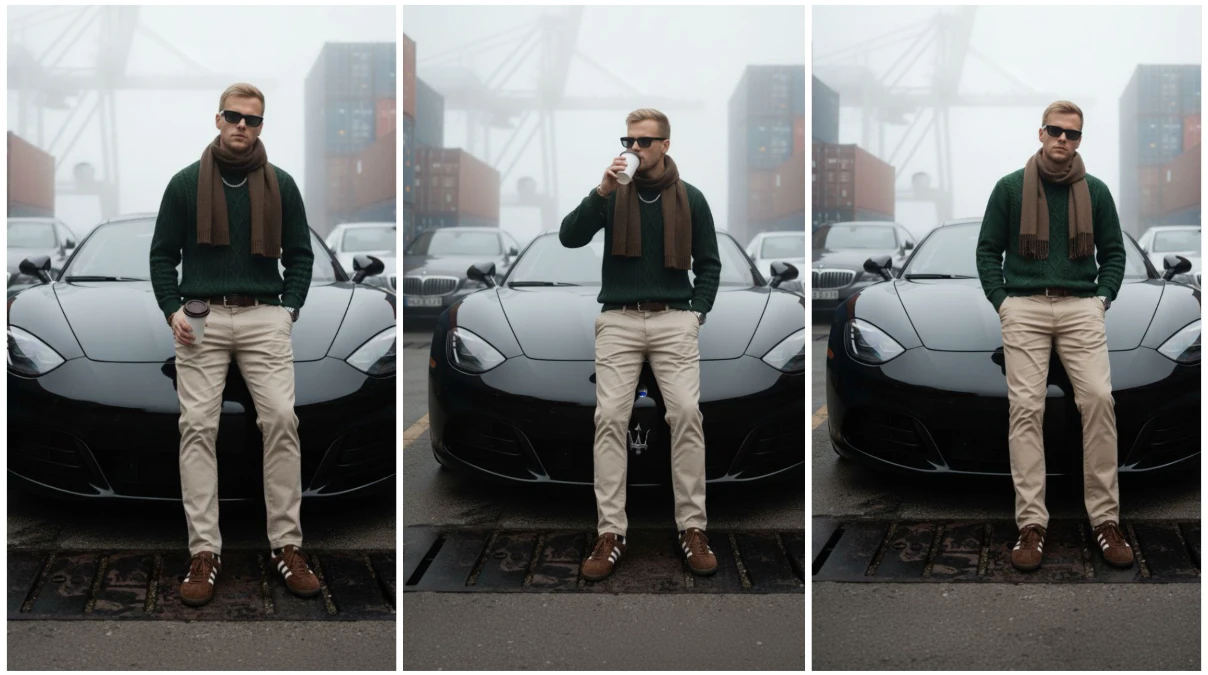
Cinematic streetwear portraits combine urban fashion culture with dramatic visual storytelling. These images capture street style with Hollywood-level production quality and atmospheric depth. With Google’s Gemini Nano technology and cutting-edge AI tools, creating stunning cinematic streetwear portraits has become accessible to everyone—from professional photographers to fashion enthusiasts.
Understanding AI-Powered Cinematic Streetwear Photography
Cinematic streetwear portraits feature dramatic lighting reminiscent of movie scenes, rich color grading with film-like tones, carefully composed urban environments, fashion-forward streetwear aesthetics, and intentional storytelling through pose and expression.
Google Gemini Nano, as part of Google’s advanced AI ecosystem, provides on-device intelligence that enhances creative workflows. When integrated with specialized AI image generation platforms, this technology enables creators to generate professional-quality cinematic streetwear portraits without expensive camera equipment, professional models, or location permits.
Essential AI Tools for Cinematic Streetwear Portraits
Premier Image Generation Platforms
Midjourney dominates the landscape for creating photorealistic cinematic portraits. Version 6.1 excels at rendering realistic skin textures, authentic fabric details, complex urban lighting, and atmospheric depth. The platform’s understanding of cinematic composition and color grading makes it particularly effective for streetwear portrait creation.
Stable Diffusion XL offers unprecedented control through its open-source architecture. Specialized models like “RealVisXL,” “Juggernaut XL,” and “DreamShaper XL” produce exceptional results. The platform supports ControlNet for pose control, Lora models trained on streetwear aesthetics, and custom checkpoints for urban photography styles.
Leonardo.ai provides intuitive controls with “PhotoReal” mode for photographic realism, “Alchemy” upscaling for enhanced detail, real-time canvas for iterative refinement, and prompt magic for automatically enhanced quality.
DALL-E 3 integrated with ChatGPT Plus offers superior prompt interpretation. Its ability to understand nuanced descriptions of streetwear styles, urban environments, and cinematographic techniques makes it ideal for conversational prompt crafting.
Playground AI specializes in creating consistent character portraits across multiple generations, invaluable when building cohesive streetwear portfolios or lookbooks.
Advanced Enhancement and Editing Tools
Topaz Photo AI revolutionizes portrait enhancement through neural networks. It sharpens facial features while maintaining skin texture, enhances clothing fabric details and logos, reduces noise in urban night scenes, and upscales to print-quality resolution.
Adobe Firefly integrated into Photoshop provides generative AI for extending urban backgrounds, adding or modifying streetwear accessories, changing weather conditions, and enhancing atmospheric elements like fog or rain.
Luminar Neo offers portrait-specific AI tools including Face AI for natural enhancement, Skin AI for realistic retouching, Body AI for subtle adjustments, and Atmosphere AI for adding cinematic fog and depth.
Remini specializes in face and portrait enhancement, sharpening facial features naturally, improving skin texture, enhancing eye detail, and increasing resolution to HD or 4K.
Color Grading and Cinematic Tools
DaVinci Resolve remains the industry standard for color grading with AI-powered magic mask for subject isolation, color warper for creative transformations, and neural engine for automatic shot matching.
Dehancer provides authentic film emulation replicating classic film stocks, adding realistic film grain, simulating lens characteristics, and creating halation effects for analog aesthetics.
Palette FM analyzes cinematic imagery and applies similar color grades. Upload your portrait, browse curated cinematic presets, preview grades in real-time, and fine-tune intensity.
Step-by-Step Guide to Creating Cinematic Streetwear Portraits
Step 1: Defining Your Cinematic Vision
Successful portraits begin with clear artistic direction:
Streetwear style influences include hypebeast aesthetics (Supreme, Off-White, BAPE), techwear futurism (ACRONYM, Nike ACG), vintage sportswear, minimalist luxury, and skate culture (Thrasher, Vans).
Cinematic lighting scenarios feature golden hour warmth with rim lighting, blue hour moodiness with neon accents, dramatic side lighting, backlit silhouettes, and overcast diffused light.
Urban environments encompass gritty alleyways with graffiti, modern glass architecture, industrial areas, vibrant street markets, and elevated viewpoints.
Color grading styles involve teal and orange cinematic contrast, desaturated bleach bypass, warm amber-toned streets, cool blue cyberpunk atmospheres, and vintage film emulations.
Step 2: Crafting Effective AI Prompts
Prompt engineering determines quality and accuracy. Structure prompts with technical photography details, streetwear fashion specifics, environmental context, cinematic lighting, and mood descriptors.
Example prompts:
“Cinematic portrait of young man in oversized Supreme hoodie and baggy cargo pants, standing in rain-soaked Tokyo street at night, neon signs reflecting in wet pavement, dramatic side lighting, shallow depth of field, shot with Arri Alexa, anamorphic lens flares, teal and orange color grading, moody atmospheric cinematography, 8K ultra detailed.”
“Urban streetwear portrait, woman wearing black techwear outfit with tactical vest, futuristic cyberpunk aesthetic, standing in modern glass building, backlit with blue rim light, sharp focus with blurred city lights background, cinematic composition, film grain, professional fashion photography.”
“Golden hour streetwear portrait, teenager in vintage Nike windbreaker and Air Jordans, shot on city rooftop during sunset, warm amber lighting, lens flare, shallow depth of field, Kodak Portra 400 film aesthetic, nostalgic mood, 4K resolution.”
Step 3: Generating Images with AI Platforms
Using Midjourney
Access via Discord and use /imagine command with your prompt. Add parameters: --ar 2:3 for portrait orientation, --style raw for photographic realism, --stylize 250-500 for balanced enhancement, and --v 6.1 for latest capabilities.
Generate variations, evaluate composition, lighting, streetwear authenticity, and facial features. Use “Upscale” for higher resolution and “Vary (Region)” to selectively regenerate areas.
Using Stable Diffusion XL
Launch Automatic1111 WebUI or ComfyUI and select photorealistic checkpoints like “RealVisXL V4.0” or “Juggernaut XL v9.” Configure sampling method DPM++ 2M Karras, 30-50 sampling steps, CFG Scale 6-8, and resolution 1024×1024.
Use negative prompts: “ugly, deformed, blurry, low contrast, bad anatomy, oversaturated, cartoon, painting, watermark, text.”
Enable Hires.fix with 2x upscale and denoising strength 0.4-0.5. Implement ControlNet with OpenPose for pose control or Depth for environmental coherence.
Using Leonardo.ai
Enable PhotoReal mode for maximum realism. Select “Cinematic” preset, adjust Prompt Magic strength (Medium to High), enable Alchemy upscaling, and set photorealistic guidance scale 7-10.
Generate 8-16 variations and use Canvas feature for inpainting, outpainting, and creative upscaling.
Step 4: Advanced Post-Processing
Portrait Enhancement
FaceApp Pro offers subtle modifications including facial structure adjustments, natural makeup application, hairstyle variations, and age modification while maintaining photorealism.
PortraitPro Studio uses AI for professional retouching with skin smoothing that preserves texture, eye enhancement, face sculpting, and lighting adjustments.
Cinematic Color Grading
Color.io provides AI-powered grading suggestions based on mood descriptors. Describe desired atmosphere (moody, vibrant, nostalgic), receive automatic suggestions, adjust color channels, and export custom LUTs.
RNI Films offers extensive film emulation presets with hundreds of film stocks including Kodak, Fuji, and Ilford emulations for authentic cinematic looks.
Step 5: Creating Depth and Atmosphere
LeiaPix Converter transforms 2D portraits into 3D depth animations. Upload your portrait, adjust depth intensity, select animation style, and export as video for social media engagement.
Runway ML provides AI tools for background replacement with lighting matching, green screen capabilities, frame interpolation, and visual effects addition.
Luma AI excels at atmospheric effects including volumetric fog and mist, realistic rain or snow, light ray simulation, and particle systems for urban dust.
Krea.ai offers real-time AI generation with instant variations, style transfer for different cinematic looks, upscaling with detail enhancement, and texture generation for backgrounds.
Specialized Techniques for Professional Results
Consistent Character Creation
InstantID and FaceID in Stable Diffusion enable consistent face generation. Load reference face image, apply InstantID model, generate multiple outfits and poses with same character, and build cohesive lookbooks.
Artbreeder allows collaborative portrait creation with face mixing, attribute sliders for fine control, and style adjustments.
Advanced Lighting Control
Relight AI by Clipdrop enables post-generation lighting adjustments. Change light direction and intensity, add multiple light sources, simulate different times of day, and maintain photorealistic shadows.
ControlNet for Precise Composition
Use OpenPose with reference poses for exact body positioning, Depth maps for spatial relationships, Canny edge detection for architectural lines, and Lineart for sketched composition guides.
Virtual Fashion Integration
Fashable.ai enables virtual try-on for AI portraits. Upload clothing designs, apply to models, adjust fit realistically, and iterate on outfit combinations.
The New Black specializes in AI fashion design, generating unique streetwear designs and applying them to portrait subjects with realistic fabric behavior.
Mobile AI Apps for Streetwear Portraits
Prequel offers cinematic filters with vintage film emulations, light leak effects, grain overlays, and streetwear-popular aesthetic presets.
VSCO provides film-inspired presets, advanced color grading tools, grain and fade effects, and split-toning for cinematic looks.
Lightroom Mobile powered by Adobe Sensei AI offers AI-enhanced automatic adjustments, selective editing with AI masking, and RAW processing.
Snapseed by Google provides perspective correction, selective adjustments, HDR effects, and lens blur for simulated depth of field.
Photoleap includes object removal and replacement, layer-based editing, cinematic color grades, and animation tools for motion portraits.
Advanced Workflows
Video Generation from Portraits
D-ID transforms static portraits into talking head videos with animated facial expressions, lip-sync capabilities, and promotional content creation.
HeyGen creates AI-generated videos from portraits with full body animation, customizable gestures, virtual wardrobe changes, and background modifications.
3D Model Creation
Luma AI generates 3D models from 2D portraits enabling 360-degree viewing, export to 3D software, AR preview capabilities, and NFT applications.
Meshcapade creates rigged 3D avatars from portraits with realistic body proportions, standard 3D formats, animation-ready structure, and virtual fitting applications.
Best Practices
Technical Standards
- Minimum 2048×2048 pixels for social media
- 4K (3840×2160) or higher for commercial use
- Proper aspect ratios: 2:3 for portraits, 16:9 for cinematic
- Save in PNG for editing, JPEG at 90%+ quality for delivery
Authentic Representation
- Research current streetwear trends and brands
- Understand subculture authenticity
- Respect cultural origins and context
- Avoid appropriation or stereotyping
Composition Principles
- Follow rule of thirds for natural balance
- Use leading lines from architecture
- Maintain appropriate headroom and looking room
- Create depth through foreground, midground, background layers
Ethical Considerations
- Disclose AI generation for commercial use
- Avoid deceptive deepfakes
- Respect intellectual property of real brands
- Maintain authenticity in representation
Future Trends
Real-time generation will enable instant portrait creation with immediate feedback and live adjustments. Multi-modal AI systems will integrate text, image, and video generation for cohesive campaigns. Hyper-personalization through AI will learn individual style preferences and adapt to brand aesthetics automatically. Virtual fashion integration will seamlessly combine AI-generated clothing with AI-generated portraits for digital-first collections.
Prompt Detail
A full-body cinematic photo of [use 100% the same face from the reference image, no facial alterations]. The man is leaning back against the front of one of three luxury cars, surrounded by a foggy seaside industrial port environment — large cargo containers, cranes, and dockside structures in the background.
Outfit: white oversized t-shirt, black baggy pants, slim silver chain, Rolex watch, black rectangular sunglasses, and white chunky sneakers.
Pose: casually leaning on the car with both hands in pockets, eyes looking toward the camera.
Lighting: natural daylight with soft reflections from metallic surfaces and ocean mist, creating a cinematic, stylish fashion-magazine atmosphere.
Quality: ultra-realistic, 8k, detailed textures, crisp focus on the subject.
Conclusion
Creating stunning cinematic streetwear portraits using Google Gemini Nano’s ecosystem and specialized AI tools has democratized high-end fashion photography. Through platforms like Midjourney, Stable Diffusion XL, and Leonardo.ai, combined with enhancement tools like Topaz Photo AI and Luminar Neo, anyone can produce gallery-worthy imagery capturing contemporary street culture with cinematic flair.
Success lies in understanding cinematographic principles, staying current with streetwear trends, mastering prompt engineering, and combining multiple AI tools throughout the creative workflow. Start experimenting today and discover that professional cinematic streetwear portrait creation is no longer limited by budget, location, or access to models and equipment—the future of fashion photography is here, powered by artificial intelligence.