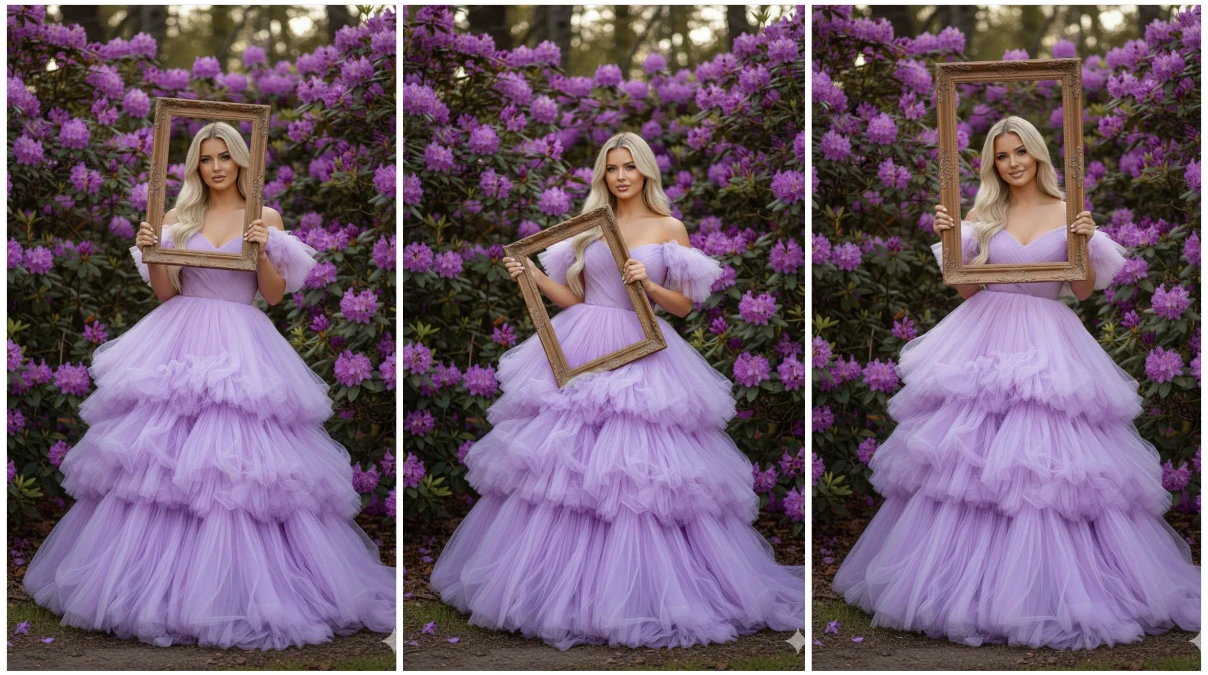
The world of AI-generated fashion photography has revolutionized how we create stunning portrait imagery. With Google’s Gemini Nano technology and innovative AI tools, anyone can now transform ordinary photos into professional-grade fashion portraits. This comprehensive guide will walk you through the process of creating breathtaking AI fashion portraits using cutting-edge artificial intelligence tools.
Understanding Google Gemini Nano and AI Fashion Portraits
Google Gemini Nano represents the lightweight, on-device version of Google’s powerful Gemini AI model. While Gemini Nano primarily focuses on text processing and device-level AI tasks, the broader Gemini ecosystem integrates seamlessly with various AI image generation tools to create stunning fashion portraits. When combined with specialized AI fashion tools, this technology enables creators to generate professional-quality fashion photography without expensive equipment or photoshoots.
AI fashion portraits leverage machine learning algorithms trained on millions of fashion images, enabling them to understand style trends, lighting techniques, pose dynamics, and clothing aesthetics. These systems can transform simple selfies into magazine-worthy fashion shots, add virtual clothing, change backgrounds, and enhance overall image quality with remarkable precision.
Essential AI Tools for Fashion Portrait Creation
Primary Image Generation Platforms
Midjourney stands as one of the most powerful AI art generators for fashion imagery. This Discord-based platform excels at creating hyper-realistic fashion portraits with exceptional attention to fabric textures, lighting nuances, and stylistic details. Users can input detailed text prompts describing clothing styles, poses, lighting conditions, and aesthetic preferences to generate custom fashion portraits.
DALL-E 3 by OpenAI offers another excellent option for fashion portrait creation. Integrated with ChatGPT Plus, DALL-E 3 understands complex fashion terminology and can generate images that closely match your vision. Its ability to incorporate text into images and maintain consistency across multiple generations makes it ideal for fashion brand concepts.
Stable Diffusion provides an open-source alternative that gives users maximum control over the generation process. With models specifically fine-tuned for fashion photography like “Realistic Vision” and “DreamShaper,” Stable Diffusion can produce commercial-quality fashion portraits. The platform runs on personal computers or through cloud services like RunDiffusion and Replicate.
AI Enhancement and Editing Tools
Adobe Firefly integrates AI-powered generative fill and expansion features directly into professional workflows. Fashion photographers use Firefly to extend backgrounds, change clothing colors, add accessories, or modify lighting in existing portraits. Its seamless integration with Photoshop makes it invaluable for professional fashion editing.
Topaz Photo AI specializes in upscaling and enhancing image quality. This tool uses advanced neural networks to sharpen details, reduce noise, and increase resolution without losing quality. For fashion portraits, Topaz can transform lower-resolution AI generations into print-ready, high-definition images suitable for magazines and billboards.
Remove.bg and Similar Background Removers employ AI to instantly isolate subjects from backgrounds with pixel-perfect precision. Fashion portrait creators use these tools to extract models from AI-generated images and composite them onto professional studio backgrounds or exotic locations.
Step-by-Step Guide to Creating AI Fashion Portraits
Step 1: Concept Development and Prompt Engineering
Begin by clearly defining your fashion portrait concept. Consider the following elements:
- Fashion style: Contemporary, vintage, haute couture, streetwear, bohemian, minimalist, or avant-garde
- Clothing details: Specific garments, colors, fabrics, patterns, and accessories
- Lighting: Natural sunlight, studio lighting, golden hour, dramatic shadows, or soft diffused light
- Pose and composition: Full body, half body, close-up, dynamic poses, or editorial stances
- Background and setting: Urban street, studio, nature, abstract, or architectural elements
- Mood and atmosphere: Elegant, edgy, playful, mysterious, sophisticated, or casual
Craft detailed prompts that incorporate these elements. For example: “Professional fashion portrait of a model wearing an elegant black evening gown with silver embroidery, dramatic studio lighting with rim light, confident pose, dark gradient background, high-fashion editorial style, shot with 85mm lens, shallow depth of field.”
Step 2: Using AI Generation Tools
With Midjourney, access the platform through Discord and use the /imagine command followed by your detailed prompt. Add parameters like --ar 2:3 for portrait aspect ratio, --style raw for photographic realism, and --v 6 for the latest model version. Generate multiple variations and select the best result, then use the upscale function for higher resolution.
With DALL-E 3, access through ChatGPT Plus or Microsoft Bing Image Creator. Provide your fashion portrait description in conversational language. DALL-E 3’s improved prompt understanding means you can describe your vision naturally, and the AI will interpret complex fashion terminology accurately.
With Stable Diffusion, use interfaces like Automatic1111 WebUI or ComfyUI. Load fashion-oriented checkpoints, adjust sampling steps (typically 20-50), set guidance scale (7-12 for balanced results), and use negative prompts to exclude unwanted elements like “blurry, distorted, low quality, bad anatomy, oversaturated.”
Step 3: AI-Powered Refinement and Enhancement
Once you’ve generated your base fashion portrait, enhancement tools elevate the final result:
Magnific AI offers extraordinary upscaling capabilities, transforming 1024×1024 images into 4K or even 8K resolution while adding fine details like fabric texture, skin pores, and hair strands that weren’t present in the original generation.
Runway ML provides AI video and image editing tools including background replacement, object removal, and style transfer. Fashion creators use Runway to animate static portraits, change outfit colors in real-time, or apply artistic filters.
Let’s Enhance uses neural networks to increase image resolution up to 16x while maintaining sharpness and detail. This tool particularly excels with fashion imagery, preserving clothing patterns and facial features during upscaling.
Step 4: Virtual Clothing and Try-On Technology
Fashable.ai and YesPlz.ai offer virtual try-on capabilities where you can dress AI-generated models in real clothing from fashion catalogs. These tools use advanced computer vision to understand body shapes and drape clothing realistically.
Lalaland.ai creates diverse AI-generated fashion models that can wear any clothing design. Fashion brands use this platform to showcase collections on models of various sizes, ethnicities, and body types without organizing physical photoshoots.
The New Black AI specializes in fashion design and allows users to generate clothing designs that can then be applied to AI fashion portraits. This tool bridges the gap between fashion design and portrait photography.
Step 5: Background Customization
Leonardo.ai offers background generation and scene extension features. Create custom fashion photography backgrounds ranging from minimalist studio setups to elaborate outdoor locations. The platform’s “Canvas” feature allows outpainting to expand portrait compositions.
Clipdrop by Stability AI provides multiple AI tools including background replacement, relighting, and image cleanup. Fashion portrait creators use Clipdrop to swap backgrounds instantly while maintaining realistic lighting and shadows.
Advanced Techniques for Professional Results
Consistency Across Multiple Shots
Maintaining model consistency across multiple fashion portraits requires specialized approaches. InstantID and FaceID technologies within Stable Diffusion allow you to generate multiple portraits of the same AI-generated model wearing different outfits or in different poses. This consistency is crucial for fashion lookbooks and catalog creation.
Lighting and Mood Adjustment
Lightroom AI presets and Luminar Neo offer AI-powered lighting adjustments. These tools can change time of day, add artificial lighting effects, or modify the overall mood of fashion portraits post-generation. Luminar Neo’s “Relight AI” specifically allows repositioning of light sources in portraits.
Pose and Body Language Refinement
ControlNet extensions for Stable Diffusion enable precise control over poses using reference images. Upload a pose reference photograph, and ControlNet ensures your AI-generated fashion model adopts the exact same stance and body positioning.
Style Transfer and Artistic Effects
Prisma and Deep Dream Generator apply artistic styles to fashion portraits, transforming photorealistic images into paintings, sketches, or stylized illustrations. Fashion brands use these effects for marketing materials that require unique visual aesthetics.
Mobile AI Fashion Portrait Apps
Smartphone Solutions
Lensa AI gained popularity for its magic avatar feature but also excels at fashion portrait enhancement. The app uses advanced AI to refine facial features, adjust lighting, and create stylized fashion portraits directly from smartphone photos.
Remini specializes in photo enhancement and can transform low-quality selfies into high-definition fashion portraits. The app’s AI understands facial features and can add realistic detail while maintaining the subject’s natural appearance.
FaceApp offers fashion-relevant features like makeup application, hairstyle changes, and age modification. Combine these tools with AI-generated clothing for complete fashion portrait transformations.
Picsart AI provides comprehensive editing capabilities including background removal, object insertion, and style filters specifically designed for fashion and portrait photography.
Best Practices for AI Fashion Portraits
Creating professional-quality AI fashion portraits requires attention to several key principles:
Quality over quantity: Generate multiple variations of your concept and carefully select the best results rather than settling for the first output. AI tools work probabilistically, and quality varies between generations.
Detailed prompting: Specific, descriptive prompts yield better results than vague requests. Include details about lighting direction, camera settings, clothing materials, and desired mood.
Iterative refinement: Use img2img workflows to progressively refine images. Start with a base generation, then use that as reference for improved versions with adjusted prompts.
Ethical considerations: Always disclose when images are AI-generated, especially for commercial use. Respect intellectual property and avoid replicating identifiable real people without permission.
Technical specifications: For print use, generate at minimum 300 DPI resolution. Use upscaling tools to achieve 3000×4000 pixels or larger for magazine-quality output.
The Future of AI Fashion Photography
The convergence of AI technologies continues advancing rapidly. Google’s Gemini ecosystem, combined with specialized fashion AI tools, democratizes professional-quality fashion photography. Real-time generation improvements mean that soon creators will generate and refine fashion portraits instantaneously with natural language instructions.
Emerging technologies like 3D-aware AI generation will enable creation of fashion portraits from any angle, video generation will transform static portraits into dynamic fashion films, and personalization AI will learn individual style preferences to suggest fashion concepts aligned with your aesthetic vision.
The integration of AI fashion tools with e-commerce platforms is already enabling virtual styling assistants, personalized fashion recommendations based on AI-generated try-ons, and completely virtual fashion shows featuring AI-generated models and clothing.
Prompt Details
Create a hyper-realistic Ultra HD 8K portrait using the uploaded image.
A woman (keep the exact same face from the reference photo, 100% identical, no alterations) stands amidst vibrant purple rhododendron bushes, holding a wooden photo frame.
She wears a voluminous, ethereal gown made of layered fluffy lilac fabric with off-the-shoulder sleeves.
Her long hair cascades naturally over her shoulders as she gazes directly into the camera.
The composition blends high-fashion elegance with a dreamlike, cinematic atmosphere.
Ultra-sharp focus, perfect lighting balance, detailed texture of fabric and skin, 8K resolution clarity, depth-of-field, and crisp bokeh background.
Fine-art editorial photography style.
Conclusion
Creating stunning AI fashion portraits using Google Gemini Nano’s ecosystem and specialized AI tools has become accessible to everyone from professional photographers to fashion enthusiasts. By combining powerful generation platforms like Midjourney, DALL-E 3, and Stable Diffusion with enhancement tools like Topaz Photo AI and Magnific, anyone can produce magazine-quality fashion imagery.
The key to success lies in understanding each tool’s strengths, crafting detailed prompts, and iteratively refining results. As AI technology continues evolving, the line between AI-generated and traditionally photographed fashion portraits blurs, opening unprecedented creative possibilities for the fashion industry.
Start experimenting with these tools today, and you’ll discover that professional fashion portrait creation is no longer limited to those with expensive equipment and studio access. The future of fashion photography is here, powered by artificial intelligence and accessible to all creative minds willing to explore its possibilities.