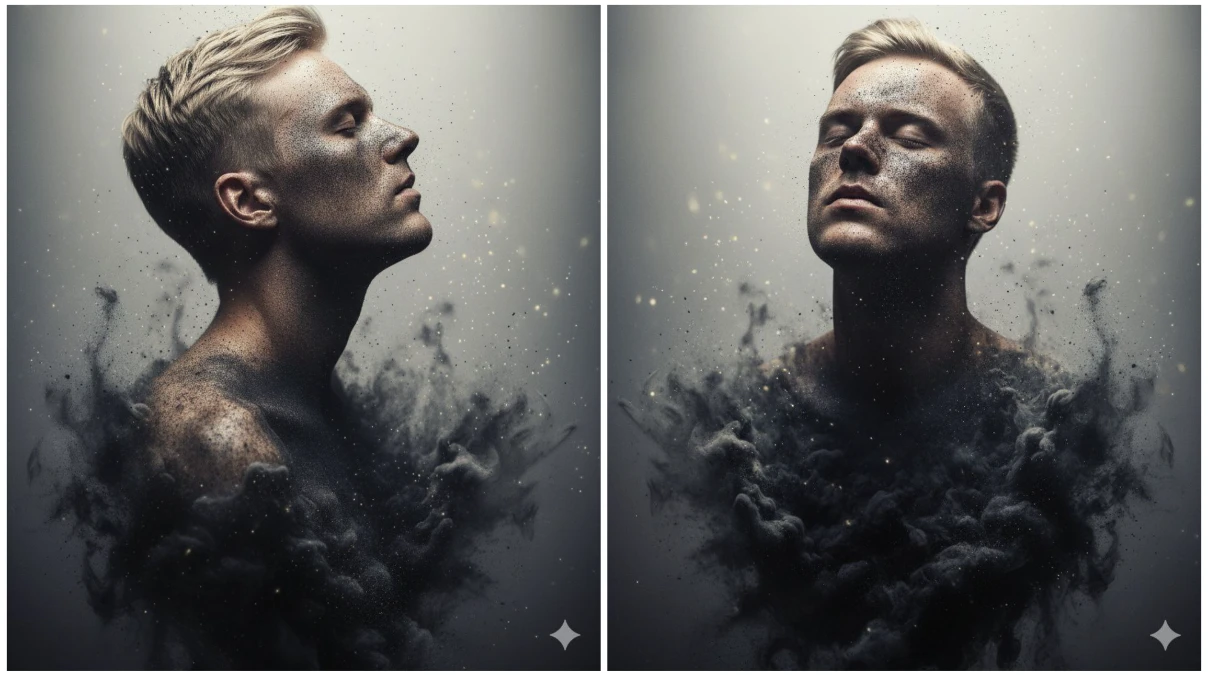
Ash and smoke photography represents one of the most captivating and dramatic forms of visual art. The ethereal nature of smoke, combined with the textural complexity of ash particles, creates mesmerizing imagery that captures fleeting moments of beauty. With the advancement of AI technology, particularly Google’s Gemini Nano ecosystem and specialized AI tools, creating stunning ash and smoke photography has become accessible to everyone, regardless of technical expertise or expensive equipment.
Understanding AI-Powered Ash and Smoke Photography
Traditional ash and smoke photography requires specialized equipment including high-speed cameras, controlled lighting setups, smoke machines, and extensive post-processing knowledge. However, AI-powered image generation and enhancement tools have revolutionized this niche, allowing creators to generate photorealistic smoke and ash imagery through text prompts and intelligent algorithms.
Google Gemini Nano, as a lightweight on-device AI model, integrates with various creative AI platforms to assist in generating detailed prompts, refining concepts, and optimizing workflows. When combined with dedicated image generation tools, this technology enables the creation of professional-quality ash and smoke photography without the need for physical setups or dangerous materials.
The beauty of AI-generated smoke and ash photography lies in its ability to capture impossible moments—perfectly timed swirls, ideal lighting conditions, and artistic compositions that would require hundreds of attempts to capture traditionally. AI understands the fluid dynamics of smoke, the particle dispersion of ash, and the interplay of light through translucent materials.
Essential AI Tools for Smoke and Ash Photography
Premier Image Generation Platforms
Midjourney stands as the industry leader for creating atmospheric and photorealistic smoke imagery. Its advanced algorithms excel at rendering the translucent, wispy nature of smoke, the granular texture of ash particles, and the dramatic lighting that makes these photographs compelling. Midjourney’s version 6 and newer models have significantly improved their ability to handle complex fluid dynamics and particle systems.
Stable Diffusion offers unmatched flexibility for smoke and ash photography through its open-source nature and extensive model ecosystem. Specialized checkpoints like “Realistic Vision XL,” “DreamShaper,” and “Juggernaut” produce exceptional results for smoke photography. The platform’s ControlNet extensions allow precise control over smoke flow patterns, enabling artists to guide smoke formations while maintaining photorealistic quality.
DALL-E 3 provides excellent results for conceptual smoke and ash photography with its superior prompt understanding. Integrated with ChatGPT Plus, DALL-E 3 interprets complex descriptions of smoke behavior, lighting conditions, and compositional elements, making it ideal for photographers who prefer conversational prompt creation.
Leonardo.ai specializes in fine-tuned control over image generation with features particularly useful for smoke photography. Its “Alchemy” upscaler and “Prompt Magic” feature enhance the detail and realism of smoke tendrils and ash particles, while the platform’s real-time canvas allows iterative refinement of compositions.
Specialized Enhancement and Editing Tools
Topaz Photo AI revolutionizes smoke photography enhancement through its neural network-based sharpening and detail recovery. When working with AI-generated smoke images, Topaz can enhance the fine details of smoke wisps, sharpen the boundaries between light and shadow, and reduce any artifacts from the generation process while maintaining the soft, ethereal quality essential to smoke photography.
Adobe Firefly integrates generative AI directly into professional workflows through Photoshop integration. For ash and smoke photography, Firefly’s generative fill allows seamless addition or removal of smoke elements, background extension, and color correction. The “Text Effects” feature can even create smoky text designs for graphic applications.
Luminar Neo offers AI-powered atmospheric effects that complement AI-generated smoke photography. Its “Atmosphere AI” tool can add fog, mist, and haze to enhance existing smoke elements, while “Sky AI” helps create dramatic backgrounds that complement the foreground smoke elements.
Runway ML provides advanced AI tools including background removal, object segmentation, and video generation. For smoke photography, Runway’s frame interpolation can transform static smoke images into smooth video sequences, showing the evolution and movement of smoke patterns over time.
Upscaling and Detail Enhancement
Magnific AI represents cutting-edge upscaling technology that adds incredible detail to smoke and ash photography. This tool doesn’t just enlarge images—it intelligently adds fine details like individual ash particles, subtle smoke gradients, and texture variations that weren’t present in the original generation, transforming 1024px images into stunning 4K or 8K masterpieces.
Gigapixel AI by Topaz specifically focuses on enlarging images up to 600% while maintaining or even improving sharpness. For smoke photography intended for large-format prints or commercial use, Gigapixel ensures that the delicate details of smoke formations remain crisp at any size.
Let’s Enhance uses advanced neural networks optimized for artistic photography. Its “Tone” and “Color” enhancement modes work particularly well with the monochromatic and low-saturation nature of smoke photography, adding depth and dimension without oversaturating the subtle color gradients.
Step-by-Step Guide to Creating AI Smoke and Ash Photography
Step 1: Conceptualization and Visual Planning
Before generating imagery, develop a clear artistic vision. Consider these essential elements:
Smoke characteristics include color (white, black, colored), density (thin and wispy vs. thick and billowing), direction and flow (rising, swirling, horizontal drift), and pattern (smooth, turbulent, layered).
Ash particle elements encompass size distribution (fine dust vs. large flakes), concentration (sparse vs. dense), motion state (suspended, falling, swirling), and interaction with light (backlit, side-lit, illuminated particles).
Lighting setup involves direction (backlight, side light, front light), quality (hard vs. soft), color temperature (cool blue vs. warm amber), and dramatic effects (rim lighting, silhouette, high contrast).
Background and context includes color (black, white, colored gradient), texture (smooth, textured, blurred), environmental setting (studio, outdoor, abstract space), and mood (mysterious, dramatic, peaceful, ominous).
Compositional approach considers framing (close-up, wide shot, macro), focal point (centered smoke, off-center flow, multiple smoke sources), depth (layered smoke elements, depth of field effects), and symmetry (balanced, asymmetrical, dynamic flow).
Step 2: Prompt Engineering for Smoke Photography
Crafting effective prompts is crucial for generating high-quality smoke and ash photography. Use specific, detailed language that describes both the technical and artistic aspects.
Example prompts for different styles:
“Professional high-speed photograph of white smoke rising against pure black background, dramatic side lighting creating rim light effect, smooth flowing smoke tendrils with intricate swirls, sharp focus with shallow depth of field, shot with 100mm macro lens, f/2.8, photorealistic, 8K resolution.”
“Ethereal colored smoke photography, vibrant purple and cyan smoke intertwining in darkness, backlit to show translucent quality, soft gradients and smooth transitions, artistic composition with negative space, professional studio photography style.”
“Ash particles suspended in air, captured with high-speed photography, golden hour lighting illuminating individual ash flakes, dark moody background, bokeh effect, cinematic atmosphere, shallow depth of field, dramatic contrast.”
“Abstract smoke art, multiple colored smoke streams colliding and mixing, black background, colorful wisps of red, blue, and yellow smoke, high contrast, flowing organic shapes, professional photography, ultra detailed.”
Step 3: Generating Images with AI Platforms
Using Midjourney for Smoke Photography
Access Midjourney through Discord and use the /imagine command followed by your detailed prompt. Add parameters for optimal results: --ar 2:3 or --ar 16:9 for desired aspect ratio, --style raw for photographic realism, --v 6.1 for the latest model version, and --chaos 20-40 for more varied smoke patterns.
Generate multiple variations (4 images per prompt), select the most compelling composition, and use the “Upscale (2x)” or “Upscale (4x)” buttons for higher resolution. Use the “Vary (Region)” tool to refine specific smoke areas while maintaining the overall composition.
Using Stable Diffusion for Smoke Photography
Launch Automatic1111 WebUI or ComfyUI interface and select a photorealistic checkpoint like “Realistic Vision v5.1” or “Absolute Reality.” Input your detailed prompt with emphasis on technical photography terms. Set sampling method to DPM++ 2M Karras or Euler A (both work well for smooth gradients), configure sampling steps between 30-50 for detailed smoke, and set CFG scale to 7-10 for balanced creativity and prompt adherence.
Use negative prompts extensively: “blurry, low quality, oversaturated, cartoonish, painting, illustration, watermark, text, grainy, noisy, unrealistic, artificial.”
Enable high-res fix with upscale factor 2x and denoising strength 0.4-0.5 for enhanced detail. Consider using ControlNet with depth or edge detection to guide smoke flow patterns based on reference images.
Using DALL-E 3 for Smoke Photography
Access through ChatGPT Plus or Bing Image Creator. Describe your smoke photography concept in natural language, including technical details about lighting, composition, and desired mood. DALL-E 3 excels at understanding complex descriptions, so explain your vision thoroughly.
Request multiple generations with slight variations: “Create this same scene but with the smoke flowing more to the left” or “Generate this with warmer lighting tones.” Download all variations and select the best composition for further enhancement.
Step 4: Advanced Refinement Techniques
Color Grading with AI Tools
Palette.fm uses AI to analyze and suggest color grading options that enhance the dramatic nature of smoke photography. Upload your generated image and explore cinematic color grades that emphasize the contrast and atmosphere.
Khroma AI learns your color preferences and suggests complementary color schemes for colored smoke photography, ensuring harmonious combinations that enhance rather than distract from the smoke formations.
Coolors.ai generates color palettes that can guide colored smoke generation or post-processing color adjustments, particularly useful when creating series of smoke photographs with consistent color themes.
Detail Enhancement and Texture Addition
Remini specializes in AI-powered detail enhancement. While primarily known for face enhancement, its general enhancement mode adds fine detail to smoke tendrils and ash particles, making them appear more photorealistic and three-dimensional.
Neural.love offers multiple AI enhancement options including super-resolution upscaling, artifact removal, and colorization. For black and white smoke photography, the colorization feature can add subtle color tints while maintaining the artistic integrity of the original composition.
VanceAI Image Enhancer provides specific enhancement modes for different photography types. The “Photography” mode optimizes contrast and sharpness specifically for photographic images, enhancing the dimensionality of smoke without introducing artificial-looking effects.
Step 5: Compositing and Advanced Manipulation
Photopea offers a browser-based alternative to Photoshop with AI-powered features. Use it to composite multiple AI-generated smoke elements, blend different smoke patterns, adjust layer opacity for ethereal effects, and apply advanced masks and gradients.
Remove.bg and Slazzer employ AI for instant background removal, allowing you to extract smoke elements from AI-generated images and composite them onto custom backgrounds. This is particularly useful when creating smoke overlays for other photography projects.
Clipdrop by Stability AI provides multiple tools for smoke photography manipulation: background replacement (swap backgrounds while maintaining realistic lighting), relighting (adjust lighting direction and intensity on smoke), cleanup (remove unwanted artifacts), and uncrop (expand compositions beyond original boundaries).
Specialized Techniques for Professional Results
Creating Animated Smoke Effects
RunwayML Gen-2 transforms static smoke photography into dynamic video sequences. Upload your AI-generated smoke image and use motion brush tools to define smoke flow direction. The AI generates short video clips showing realistic smoke movement and evolution.
Pika Labs specializes in AI video generation from static images. Describe the motion you want: “smoke rising upward with gentle swirling motion” or “ash particles falling downward slowly,” and the AI animates your static smoke photography into engaging video content.
Kaiber AI creates artistic video transformations of smoke photography, adding movement while maintaining or enhancing the stylistic qualities of the original image. Particularly effective for music videos and creative projects requiring dreamlike smoke sequences.
Multi-Layer Smoke Compositions
Canva AI offers Magic Studio features for creating complex compositions. Layer multiple AI-generated smoke elements, adjust transparency and blend modes, add text with smoke effects using “Text to Image,” and create social media graphics incorporating smoke photography.
Fotor AI provides collage and composition tools with AI-powered layout suggestions. Combine multiple smoke photographs into artistic arrangements, apply consistent color grading across multiple images, and create thematic series of smoke photography.
3D Smoke Effects and Depth Enhancement
LeiaPix Converter transforms 2D smoke photography into 3D depth animations. Upload your AI-generated smoke image, and the AI analyzes depth information to create parallax effects. The resulting animation shows dimensional layers within the smoke, enhancing the three-dimensional quality.
DepthAI generates depth maps from smoke photography, enabling advanced depth-of-field adjustments, selective focus effects on specific smoke areas, and realistic bokeh enhancement in post-processing.
Mobile Apps for Smoke Photography Creation
Smartphone AI Solutions
Procreate Pocket with AI-powered brushes allows manual creation and enhancement of smoke effects on mobile devices. The app’s symmetry tools help create mirror smoke compositions, while blend modes facilitate realistic smoke compositing.
Snapseed by Google includes AI-enhanced selective adjustments perfect for smoke photography enhancement. Selectively adjust specific smoke areas, enhance contrast and structure, apply drama filters for moody atmospheric effects, and use healing tools to remove unwanted elements.
PicsArt AI provides comprehensive editing with smoke-specific features including AI smoke overlay effects, background blur and depth effects, color splash for selective coloring, and artistic filters that complement smoke aesthetics.
TouchRetouch uses AI to remove unwanted objects from smoke photography, clean up distracting background elements, eliminate artifacts from AI generation, and perfect compositions through intelligent content-aware filling.
PhotoRoom specializes in background manipulation with instant background removal for smoke elements, custom background addition, shadow and reflection generation, and batch processing for multiple smoke photographs.
Advanced AI Techniques for Realistic Smoke
ControlNet Integration for Precise Control
ControlNet extensions in Stable Diffusion enable unprecedented control over smoke generation. Use depth maps to guide smoke positioning in three-dimensional space, edge detection to maintain specific smoke shapes and boundaries, pose detection adapted for smoke flow patterns, and line art to sketch desired smoke patterns as generation guides.
Inpainting for Selective Refinement
AI inpainting allows targeted improvement of specific areas within smoke photography. Regenerate unsatisfactory smoke sections while preserving the rest, add additional smoke elements to existing compositions, refine particle details in specific regions, and adjust lighting on isolated smoke areas.
Img2Img Workflows for Iterative Enhancement
Use img2img techniques to progressively refine smoke photography. Start with a rough composition, then progressively reduce denoising strength (0.7 → 0.5 → 0.3) to refine details while maintaining the overall structure. Add specific detail-enhancing prompts like “more intricate smoke swirls” or “visible ash particles.”
Best Practices for AI Smoke Photography
Creating professional-quality AI-generated smoke and ash photography requires attention to several key principles:
Technical specifications include generating images at minimum 2048×2048 resolution for detailed smoke textures, using 300 DPI for print-ready output, maintaining proper bit depth (16-bit for maximum tonal range), and saving in lossless formats (PNG, TIFF) until final export.
Prompt refinement strategies involve starting with basic prompts and progressively adding detail, using photography-specific terminology (aperture, shutter speed, lens type), including lighting direction and quality descriptors, and specifying desired mood and atmosphere explicitly.
Artistic considerations encompass balancing negative space with smoke elements, maintaining visual interest through varied smoke density, creating depth through layered smoke formations, and ensuring the composition guides viewer attention effectively.
Post-processing workflow should include upscaling to desired final resolution, color grading for mood enhancement, sharpening specific areas for emphasis, and artifact removal through AI cleanup tools.
Ethical and legal considerations require disclosing AI generation when used commercially, respecting copyright when using reference images, avoiding misleading representations in journalistic contexts, and maintaining artistic integrity through thoughtful creation rather than mass production.
Future of AI Smoke Photography
The rapid advancement of AI technology continues expanding creative possibilities in smoke and ash photography. Emerging technologies promise even more realistic and controllable results:
Real-time generation will enable instant smoke photography creation with immediate feedback and adjustment, allowing photographers to “direct” smoke behavior as if controlling a physical setup.
4D smoke generation incorporating temporal dynamics will create video sequences showing smoke evolution over time with physically accurate fluid dynamics, enabling creation of entire smoke performances from text descriptions.
Multi-sensory AI may eventually describe not just visual aspects but incorporate contextual information about temperature, movement, and environmental factors, creating more immersive and realistic smoke imagery.
Neural rendering techniques will bridge the gap between AI generation and traditional 3D rendering, allowing precise control over smoke properties while maintaining photorealistic quality.
Prompt Detail
Ultra-realistic, artistic dark portrait of the same person (from the uploaded image), with their head tilted slightly back and eyes closed. Subtle soot-like smudges and fine particulate texture accentuate the contours of the face, emphasizing emotion and depth. The shoulders and neck dissolve into an abstract mass of dark, swirling material resembling ash, smoke, or shadow, with scattered particles rising into a soft, light, ethereal background. The composition conveys transformation, disintegration, and emotional intensity — cinematic lighting, sharp details, moody atmosphere, fine art aesthetic.
Conclusion
Creating stunning ash and smoke photography using Google Gemini Nano’s ecosystem and specialized AI tools has democratized access to this challenging photography niche. Through platforms like Midjourney, Stable Diffusion, and DALL-E 3, combined with enhancement tools like Topaz Photo AI and Magnific, anyone can produce gallery-worthy smoke imagery without expensive equipment or dangerous materials.
The key to success lies in understanding prompt engineering, iteratively refining results, and thoughtfully combining multiple AI tools throughout the creative workflow. As AI technology continues evolving, the distinction between AI-generated and traditionally captured smoke photography becomes increasingly irrelevant—what matters is the final artistic vision and emotional impact of the imagery.
Start experimenting with these tools today, and discover that professional smoke and ash photography is no longer limited by technical barriers or safety concerns. The future of creative photography is here, powered by artificial intelligence and limited only by imagination.